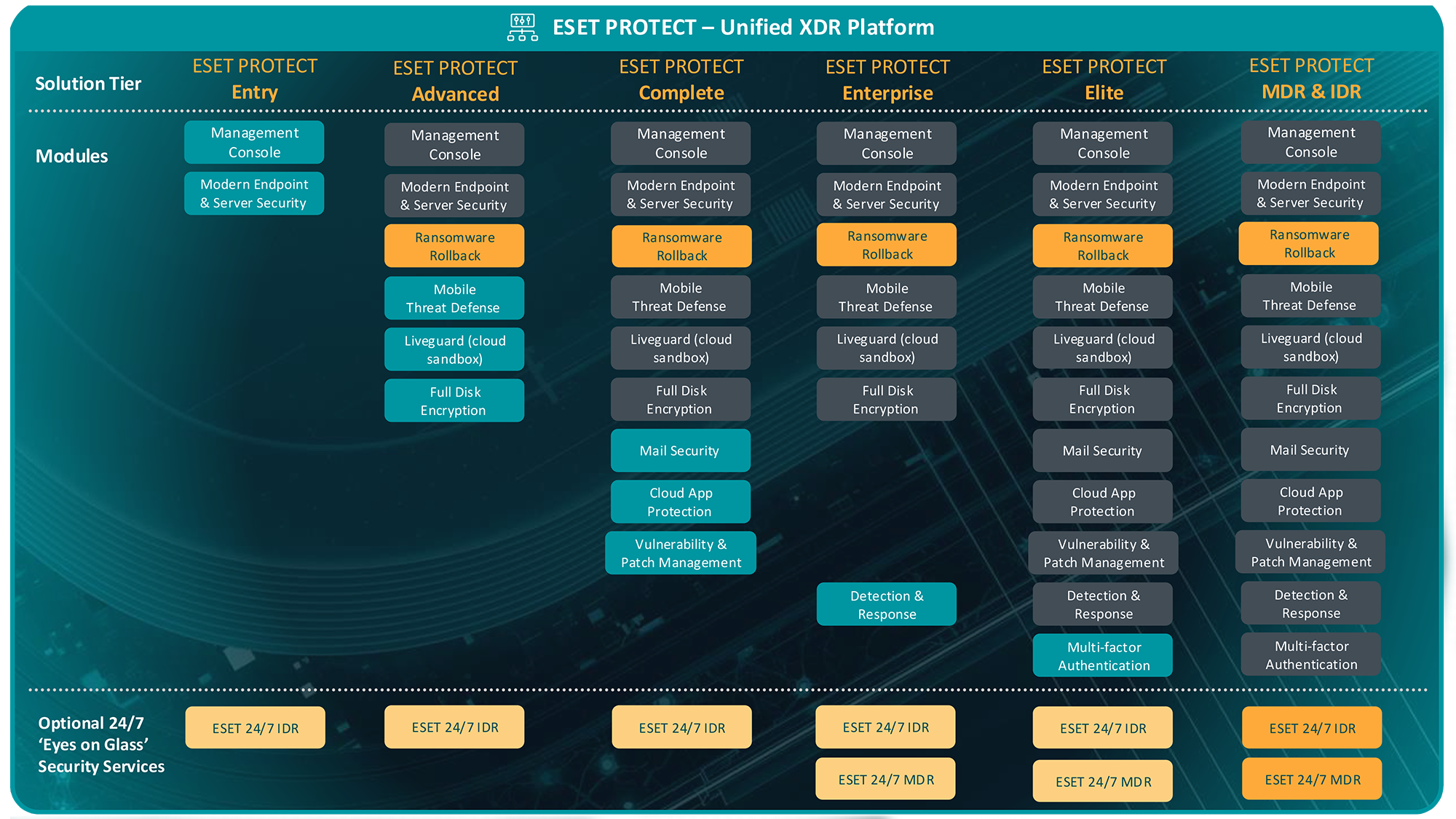
The feature is designed for zero-day ransomware. Ransomware Shield will detect the ransomware, terminate its process, and quarantine it, allowing Ransomware Remediation to back up and recover damaged files. Additionally, ESET Endpoint Security uses ESET LiveGrid® reputation system that helps to improve the overall efficiency against malware. ESET designed ESET LiveGuard to add another layer of protection and mitigate new threats in the wild.
Only NTFS formatted drives are supported. No removable media, such as flash drives or other USB devices, are supported. All local drives and folders are protected. The administrator can define exclusions from this protection. It is not possible to protect only a specific file inside a folder. This can be partially managed by defining file extensions that need to be protected.
The feature is available only if ESET Management Agent 12.0 and later is installed on a client computer managed by the cloud ESET PROTECT or ESET PROTECT On-Prem 12.0 and later. This feature is managed-only (by the cloud ESET PROTECT or ESET PROTECT On-Prem 12.0 and later) and is not supported for unmanaged endpoint security products. After activation, Ransomware Remediation settings will appear in the local Advanced setup > Protections > HIPS > Ransomware Shield. The Ransomware Remediation must be activated with suitable license and the policy with enabled Restore files after a ransomware attack setting.
The Ransomware Shield triggers the backup component (Ransomware Remediation). Real-time file system protection allows the backup component to delay write operations to protected file types and create copies on the fly. The backup will start for processes monitored and identified as suspicious by Ransomware Shield. ESET LiveGrid® must be enabled for Ransomware Shield to function properly. Real-time file system protection can guarantee that the backup component can always create a copy before the requested write operation by ransomware can occur.
No retention period is needed as backups are discarded immediately after the Ransomware Shield determines the process is not malicious. If Ransomware Shield detects the process as malicious, the files in the backup are restored into their original folders.
Backup requires free space on the local system drive. The backup process will stop if the free space on volume is below minimum system requirements. The maximum size of a file kept in backup is 30 MB.
The Self-Defense and Access Control List (ACL) protects the backup files.
Backup files cannot be erased or deleted unless in safe mode, where Self-Defense is not active. They are deleted after the process is considered not malicious.
Backup files are protected from encryption by ransomware.
Files in the backup folder are encrypted and in ESET file type. When recovered, the original content is restored as a copy with _restored at the end of the file name.
Ransomware cannot modify a locked file (for example, locked by another process, operating system, etc.). Access Control List (ACL) settings are maintained for the original file.
The restoration does not affect previously defined user privileges for original file, but local (restricted) users may face restrictions defined by the ACL.
Windows Shadow Copy Service (VSS) is susceptible to attacks. Ransomware can create encrypted copies of files and delete originals at once afterward. This is a regular delete operation with no direct modification. Then, it can discard all snapshots of VSS (if they were created), and no recovery is possible. Therefore the ESET uses a proprietary copy-on-write process backed by Real-time file system protection.
If the Ransomware Shield determines the file behavior is not problematic, no notifications are shown to the user or admin. The Ransomware Remediation storage may temporarily grow and later be deleted.
Backup speed depends on the hard drive type and CPU speed but should be fast enough to remain unnoticed.
Encrypted files by ransomware are kept in the original folder for further investigation and can be deleted by the user if no longer needed. In case of false positives (e.g. files modified by custom backup software), you can use these files as they were not encrypted, and files recovered from our backup are copies of those files only.
ESET Protect Enterprise scored highly in the EPR Strategic Leader Quadrant in the recently published Endpoint Prevention and Response (EPR) Comparative Report 2024 by independent testing house AV-Comparatives. ESET stopped and reported most attack scenarios early, neutralizing remaining threats in the second phase. As a result, ESET achieved top rankings in prevention, detection, response, and reporting.
“ESET has proven its strength in endpoint security and EDR, earning recognition as a Strategic Leader for the fourth time since the certification’s introduction. Notably, ESET’s exceptional performance is also recognized in the leading Business security benchmarks, setting it apart in the industry“
Stated by Andreas Clementi, CEO & Founder of AV-Comparatives.







Chillisoft will help you understand how ESET can help with your security needs.